Wednesday, October 23, 2013

Adjust WB on 40D


[1] http://www.dpreview.com/forums/thread/2284675#forum-post-27416922


First, get it as close as you can using custom white balance.
1. Get a white card or a piece of white poster board.
2. Prop it up where your subject will sit.
3. Take an out-of-focus picture of it (be sure to fill the frame with the white card).
4. In your 40D's menu, find the "Custom White Balance" setting.
5. Select the picture you just took.
Now your white balance setting will be very close to reality, if not actually spot-on. Next, shoot RAW quality. In your RAW conversion software of choice (probably DPP, which came with your camera), use the eye-dropper to set your white balance. The white of your subject's eye is usually an excellent WB reference point. Teeth are usually yellowish, making them a very bad reference point.

Monday, September 23, 2013

Plumbing --- Plumber Tape Teflon Tape for Thread seal


Ref [1] Family Handyman


Use two types of Teflon on threaded joints

« Previous Photo
Connections that rely on threaded pipes and fittings are prone to leaks if they're not sealed with either Teflon tape or Teflon pipe joint compound. Careful plumbers use both on every joint for extra security. They don't want to come back.
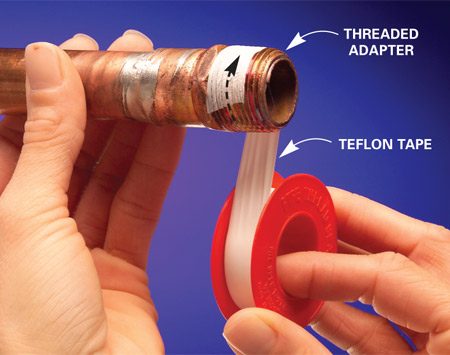
Start by wrapping the male threads with Teflon tape (Photo 1). With the end of the threaded pipe facing you as shown, wrap the tape clockwise. Usually three layers is enough. Once in a while, you'll run into a loose fitting that requires four or five wraps. Stretch and tear the tape to complete the wrap.
Spread a thin layer of Teflon pipe joint compound over the tape (Photo 2). If you're working with plastic pipe, choose Teflon pipe joint compound that's compatible with it. Then start the threads by hand before tightening the connection with wrenches (Photo 3). Wipe away the excess.

Lubricate the ferrule on compression joints

« Previous Photo
Compression joints are most common on shutoff valves, although you find them on other fittings as well. They have a brass or plastic ring (ferrule) that's compressed into a recess when you tighten the nut, forming a seal. Lubricating the pipe and the ferrule with a bit of Teflon pipe joint compound (Photo 1) helps the ferrule slide along the pipe and squeeze tightly into the recessed fitting with less wrench pressure (Photo 2). Tighten compression fittings firmly with two wrenches to crimp the ferrule onto the pipe (Photo 3). Also make sure the pipe or tube goes straight into the fitting. Misalignment will cause a leak. If the fitting leaks after you turn on the water, try tightening the nut an additional one-quarter turn. This usually stops the leak.

Align slip joints precisely for a tight seal

« Previous Photo
Joints on chrome trap assemblies rely on rubber slip joint washers for the seal, which often leak. If you're reassembling a chrome trap, buy new slip joint washers and nuts. However, new washers sometimes stick to the pipe, causing them to twist or distort as you push them tight with the slip joint nut. To avoid this, lubricate the drain tubing and slip joint with a little pipe joint compound (Photo 1). The compound helps the washer slide smoothly and creates a tighter seal.
Start the slip joint nut by hand, and twist it on until the threads are engaged correctly. Hand-tighten all joints first (Photo 2). Then adjust the trap parts until they're aligned and pitched slightly for drainage. This is key; a misaligned joint will leak, even with new washers. Finally, use a large slip joint pliers to tighten the nuts an additional half turn.
Plastic trap parts use hard plastic slip joint washers for a seal. Make sure the flat part is against the nut with the tapered side facing the fitting.

Choose flexible supply tubes

Next Photo »
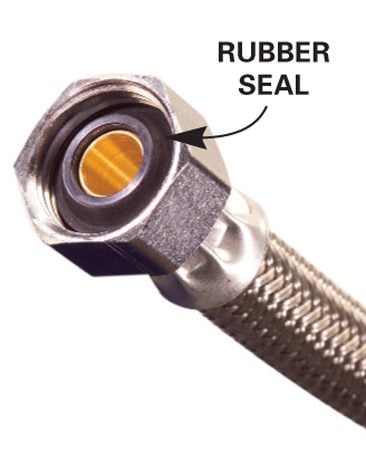
The skinny copper or chrome supply tubes used to connect faucets and toilets (Photo 1) are tricky to cut, bend and align. But you don't have to put up with them. When you're replacing a faucet or toilet, use flexible supply hoses with a braided covering instead (Photo 2). They have rubber gaskets at each end and don't require much force to seal. They're available in many lengths and are flexible enough to fit almost any configuration. The only trick is buying a connector with the correct size nuts on the ends. Take your old tubing and the nuts on each end along with you to the store to be sure of an exact match.
Start the nuts carefully and hand-tighten. Then tighten an additional half turn (Photo 2). Avoid overtightening. It's easy to tighten the nuts a little more if the joint leaks.

Electrical Wiring Colour


Ref [1]  http://www.accesscomms.com.au/reference/powerplug.htm
Ref [2] http://en.wikipedia.org/wiki/Electrical_wiring_in_the_United_Kingdom

According to [2]
Pre-1977 IEEPre-2004 IEECurrent IEC
Protective earth (PE)Color wire green.svgColor wire green yellow.svgColor wire green yellow.svg
Neutral (N)Color wire black.svgColor wire black.svgColor wire blue.svg
Single phase: Line (L)Color wire red.svgColor wire red.svgColor wire brown.svg
Three-phase: L1Color wire red.svgColor wire red.svgColor wire brown.svg
Three-phase: L2Color wire yellow.svgColor wire yellow.svgColor wire black.svg
Three-phase: L3Color wire blue.svgColor wire blue.svgColor wire grey.svg

According to [1]

Australian 3-Pin Electrical Mains Plug

The domestic mains power supply in Australia is 240V AC, 50Hz. Standard 3-pin earthed power outlets are rated at 10Amps and are usually switched. The 3-flat-pin plug is used in all states of Australia (including its external territories), New Zealand, Papua New Guinea and the Solomon Islands.  Although the configuration is similar to mains plugs used in mainland China, dimensional differences to the plug body may be incompatible with recessed cord socket and prevent Chinese-compliant CPCS/CCC (CCEE) plugs from being legally sold/used in Australia.  Argentina also uses a similar 3-flat-pin configuration as Australia, but with slight dimensional differences and with the active and neutral wires being reversed. These important differences prevent the Argentina-compliant IRAM plugs from being legally sold/used in Australia as incorrect polarity may present an electrical safety hazard.
The Australian mains plug configuration was originally presented as provisional standard C112 in 1937, formalised as Standard C112 in 1938, redesignated AS3112 in 1981 and harmonized with the New Zealand standard and redesignated AS/NZS3112 in 1993.  Australian Standards AS/NZS 3112:2000 and AS/NZS3112:2004 for Australian Mains Plugs now define the requirements for theinsulation of the Active and Neutral pins of the plug.  15Amp and 20Ampconfigurations of the mains plug and outlet are also defined by the standard.
The following diagram shows the Australian plug wiring configuration.
australian 3 pin wall socket for 240 volt ac power distribution Australian 3 Pin Mains Plug 240V AC
The diagrams below show wiring for an Australian 240V mains cord plug and socket. Note the "reversal" of the Active and Neutral wires depending on whether you are wiring a socket or a plug.
Australian 240V mains socket wiring Australian 240V mains power plug wiring

Standard wire colors are:

MarkingFlex conductor colorsBuilding wire conductor colors
ActiveABrownRed
NeutralNBlueBlack
EarthEGreen/YellowGreen/Yellow

Older flex and premises wiring will use the following colors:

MarkingFlex conductor colorsBuilding wire conductor colors
ActiveARedRed
NeutralNBlackBlack
EarthEGreenGreen
Check out our extensive range of Power cords, AC adaptors, In-line switch mode power supply units and Power components from our on-line catalog.

Thursday, September 12, 2013

Which 3G Networks offer public IPs?


Reference:
[1] http://forums.whirlpool.net.au/archive/1501815


We need an unofficial list of our 3G ISP specs given their differences and it's not practical for anyone to have to buy and try dongles/SIMs from each network (both pre & post paid) just to try.

While all will allow web browsing & email, beyond that seems cloaked in secrecy.

Many networks are actually private networks, behind a NAT, without a publicly accessible IP (either dynamic or static) preventing many common functions such as remote control (of routers and PCs), IP cameras, VPNs & servers. Presumably there aren't enough public IP addresses to go round but at least there should be mechanisms such as port forwarding. Or other options?

Telstra 3G (post paid) is private (& I would assume also prepaid) but I'm advised Bigpond offers public IPs – except I'd need to sign up to a contract just to try!! I'm aware Virgin Broadband at Home (post paid) is public (via Optus 3G) but suspect Virgin prepaid is private. I have No Further Information (NFI) on Optus, 3/Vodafone or others (if different from their host such as Bigpond & Telstra on NextG).

=============at 2010-Aug-2, 1:38 pm===============
Exetel – external, fixed IP
Beagle – external dynamic IP, optionally fixed IP.
Optus – external dynamic IP
Telstra Prepaid – Private network behind NAT
Vodafone – mostly external dynamic IP (but not always – hard to figure out why)

Virgin prepaid is public (VirginInternet APN)

Internode only offer public, with optional static

Telstra BigPond is public

Telstra 3G internet is only private for the usual default APN's:
telstra.internet
telstra.wap
telstra.iph

However if you're a Telstra business mobile account holder you can request the "GPTEXB3" code to be activated on your account to allow access to the "telstra.extranet" APN.
When telstra.extranet is used (billed with the same data allowances as telstra.internet) you will be allocated a public dynamic IP in the 123.209.x.x IP range. If you keep your device active you'll have the same IP for days or weeks at a time so it's almost static!

Monday, September 9, 2013

TPG IPTV over Wireless with Netcomm N150/NB14WN


http://www.youtube.com/watch?v=aZYrOsW3gEo&noredirect=1

I was able to set my desktop up the way you see because I am using Linux (Ubuntu 10.04). The desktop is Gnome 2.30. The dock is Cairo dock. The transparent panel is conky. If you are running Ubuntu let me know and I will point you to the relevant links to install and configure the other stuff.


Thursday, August 22, 2013

Windows command line


[1] http://en.kioskea.net/faq/403-command-prompts-for-windows


Control Panel

  • CONTROL: opens the control panel window
  • CONTROL ADMINTOOLS: opens the administrative tools
  • CONTROL KEYBOARD: opens keyboard properties
  • CONTROL COLOUR: opens display properties with the appearance tab
  • CONTROL FOLDERS: opens folder options
  • CONTROL FONTS: opens font policy management
  • CONTROL INTERNATIONAL or INTL.CPL: opens the regional and language option
  • CONTROL MOUSE or MAIN.CPL: opens mouse properties
  • CONTROL USERPASSWORDS: opens user accounts editor
  • CONTROL USERPASSWORDS2 or NETPLWIZ: user account access restrictions
  • CONTROL PRINTERS: opens faxes and printers available
  • APPWIZ.CPL: opens the add or remove programs utility tool
  • OPTIONALFEATURES: opens the add or remove windows component utility
  • DESK.CPL: opens display properties with the themes tab
  • HDWWIZ.CPL: opens add hardware wizard
  • IRPROPS.CPL: infrared utility tool
  • JOY.CP: opens game controllers settings
  • MMSYS.CPL: opens sound and audio device properties with the volume tab
  • SYSDM.CPL: opens system properties
  • TELEPHON.CPL: opens phone and modem options
  • TIMEDATE.CPL: date and time properties
  • WSCUI.CPL: opens Windows Security Center
  • ACCESS.CPL: opens accessibility options
  • WUAUCPL.CPL: opens automatic updates
  • POWERCFG.CPL: opens power options properties
  • AZMAN.MSC: opens authorisation management utility tool
  • CERTMGR.MSC: opens certificate management tool
  • COMPMGMT.MSC: opens the computer management tool
  • COMEXP.MSC or DCOMCNFG: opens the computer services management tool
  • DEVMGMT.MSC: opens device manager
  • EVENTVWR or EVENTVWR.MSC: opens event viewer
  • FSMGMT.MSC: opens shared folders
  • NAPCLCFG.MSC: NAP client configuration utility tool
  • SERVICES.MSC: opens service manager
  • TASKSCHD.MSC or CONTROL SCHEDTASKS: opens schedule tasks manager
  • GPEDIT.MSC: opens group policy utility tool
  • LUSRMGR.MSC: opens local users and groups
  • SECPOL.MSC: opens local security settings
  • CIADV.MSC: opens indexing service
  • NTMSMGR.MSC: removable storage manager
  • NTMSOPRQ.MSC: removable storage operator requests
  • WMIMGMT.MSC: opens (WMI) Window Management Instrumentation
  • PERFMON or PERFMON.MSC: opens the performance monitor
  • MMC: opens empty console
  • MDSCHED: opens memory diagnostics tools
  • DXDIAG: opens DirectX diagnostics tools
  • ODBCAD32: opens ODBC data source administrator
  • REGEDIT or REGEDT32: opens registry editor
  • DRWTSN32: opens Dr. Watson
  • VERIFIER: opens driver verifier manager
  • CLICONFG: opens SQL server client network utility
  • UTILMAN: opens utility manager
  • COLORCPL: opens color management
  • CREDWIZ: back up and recovery tool for user passwords
  • MOBSYNC: opens synchronization center
  • MSCONFIG: opens system configuration utility
  • SYSEDIT: opens system configuration editor (careful while using this command)
  • SYSKEY: Windows account database security management (careful while using this command)

Windows utility and applications

  • EPLORER: opens Windows Explorer
  • IEXPLORER: opens Internet Explorer
  • WAB: opens contacts
  • CHARMAP: opens character map
  • WRITE: opens WordPad
  • NOTEPAD: opens Notepad
  • CALC: opens Calculator
  • CLIPBRD: opens Clipbook Viewer
  • WINCHAT: opens Microsoft Chat Interface
  • SOUNDRECORDER: opens sound recording tool
  • DVDPLAY: run CD or DVD
  • WMPLAYER: opens Windows Media Player
  • MOVIEMK: Opens untitled Windows Movie Maker
  • OSK: opens on-screen keyboard
  • MAGNIFY: opens Magnifier
  • WINCAL: opens Calendar
  • DIALER: opens phone dialer
  • EUDCEDIT: opens Private Character Editor
  • NDVOL: opens the mixer volume
  • RSTRUI : opens Tool System Restore (For Vista only)
  • %WINDIR%\SYSTEM32\RESTORE\rstrui.exe: opens Tool System Restore (for XP only).
  • MSINFO32: Opens System Information
  • MRT : launches the utility removal of malware
  • Taskmgr : Opens the Windows Task Manager
  • CMD: opens a command prompt
  • MIGWIZ: Opens the tool for transferring files and settings from Windows (Vista only)
  • Migwiz.exe: Opens the tool for transferring files and settings from Windows (for XP only)
  • SIDEBAR: Open the Windows (Vista only)
  • Sigverif : Opens the tool for verification of signatures of files
  • Winver : Opens the window for your Windows version
  • FSQUIRT: Bluetooth Transfer Wizard
  • IExpress opens the wizard for creating self-extracting archives. Tutorial HERE
  • MBLCTR: opens the mobility center (Windows Vista only)
  • MSRA : Opens Windows Remote Assistance
  • Mstsc : opens the tool connection Remote Desktop
  • MSDT: opens the diagnostic tools and support Microsoft
  • WERCON: opens the reporting tool and solutions to problems (for Vista only)
  • WINDOWSANYTIMEUPGRADE: enables the upgrade of Windows Vista
  • WINWORD : opens Word (if installed)
  • PRINTBRMUI : Opens migration wizard printer (Vista only)

Disk management

  • DISKMGMT.MSC: opens disk management utility
  • CLEANMGR: opens disk drive clean up utility
  • DFRG.MSC: opens disk defragmenter
  • CHKDSK: complete analysis of disk partition
  • DISKPART: disk partitioning tool

Connection management

  • IPCONFIG: lists the configuration of IP addresses on your PC (for more information type IPCONFIG/? in the CMD menu)
  • INETCPL.CPL: opens internet properties
  • FIREWALL.CPL: opens Windows firewall
  • NETSETUP.CPL: opens network set up wizard

net stats srv      system uptime and server statistic


Miscellaneous commands

  • JAVAWS: View the cover of Java software (if installed)
  • AC3FILTER.CPL: opens the properties AC3 Filter (if installed)
  • FIREFOX: Mozilla launches Firefox (if installed)
  • NETPROJ: allow or not connecting to a network projector (For Vista only)
  • LOGOFF: closes the current session
  • SHUTDOWN: shuts down Windows
  • SHUTDOWN-A: to interrupt Windows shutdown
  • %WINDIR% or %SYSTEMROOT%: opens the Windows installation
  • %PROGRAMFILES%: opens the folder where you installed other programs (Program Files)
  • %USERPROFILE%: opens the profile of the user currently logged
  • %HOMEDRIVE%: opens the browser on the partition or the operating system is installed
  • %HOMEPATH%: opens the currently logged user C:\Documents and Settings\ [username]
  • %TEMP%: opens the temporary folder
  • VSP1CLN: deletes the cache for installation of the service pack 1 for Vista
  • System File Checker (Requires Windows CD if the cache is not available):
    • SFC / scannow: immediately scans all system files and repairs damaged files
    • SFC / VERIFYONLY: scans only those files system
    • SFC / Scanfil = "name and file path": scans the specified file, and repairs if damaged
    • SFC / VERIFYFILE = "name and file path": Scans only the file specified
    • SFC / scanonce: scans the system files on the next restart
    • SFC / REVERT: return the initial configuration (For more information, type SFC /? In the command prompt CMD.

Tuesday, August 20, 2013

Turn off vodafone prepaid voice mail.


How to switch Voicemail off through your phone

Tags: Voicemail
If you would prefer not to use Voicemail, you can remove the service using your phone
Your diversions to the service can be removed by following the instructions below. It’s also easy to reactivate your Voicemail if you want to switch the service back on later.

What it costs

There is no charge to deactivate your Voicemail.
Charges apply for calls to ‘121’ and ‘0414 121 121’ for Voicemail, refer your plan information for call rate details.
If you are postpaid, you can add an Infinite Voicemail Add-on for unlimited calls to your Voicemail within Australia for a flat monthly fee.

Switching off Voicemail

Step 1

Call '1210' from your phone (free call) to deactivate all of your Voicemail diversion, including when your phone is not answered, unreachable or engaged.

Step 2

Once your Voicemail service is deactivated, Call Catcher will be enabled.
If you'd rather no have a messaging service active, call ‘121600’ (free call) and select option ‘2’ to deactivate Call Catcher.

Re-enabling Voicemail

Step 1

To re-enable your Voicemail at anytime, simply dial '1211' from your phone. This will restore your Voicemail diversions for when your phone is not answered, unreachable or engaged.

Important information

  • If you have found that all of your calls are being answered by Voicemail instead of ringing through to your phone, try dialling '1213' instead of the instructions above. '1213' will remove an all call diversion to Voicemail


How to activate Call Catcher from your phone

Tags: Call Catcher
See your missed calls with Call Catcher
Call Catcher is an alternative to Voicemail, giving callers the option to send their contact number to you as a TXT.  Call Cather will continue to function when your phone is switched off or out of range, which gives it a significant advantage over the missed calls list in your phone.

How much does it cost

You're not charged for Call Catcher to be active, and there is no charge for the TXT notifications that are sent to you.

How it works

  1. With Call Catcher active, your callers will be given the option to have a TXT sent to you with the number they're calling from or an alternate contact number
  2. Here's an example of what you'll get if a caller chooses to have a TXT sent: “Hi! You missed a call at hh:mm on dd/mm/yyyy. Please phone [return phone number] to return the call. For Call Catcher info or opt out, freecall 121600.”
  3. Most phones will allow you to return the call directly from the TXT message, usually by tapping the number on touch screen phones, or pushing the call button

Activating Call Catcher

Step 1

Dial ‘121600’ (free call).

Step 2

Stay on the line, and select option '3' when prompted to switch Call Catcher on.

Step 3

After confirming that Call Catcher is enabled, the call will be disconnected.  That's it!  You're now up and running with Call Catcher.